





Online accounts contain valuable personal and financial information, making them attractive targets for cybercriminals. Weak or reused passwords increase the risk of unauthorized access, identity theft, and data breaches. Creating strong passwords and following good security practices are simple but effective ways to protect your digital life. This guide explains how to build secure passwords and manage them safely across all your online accounts.
Understand What Makes A Strong Password
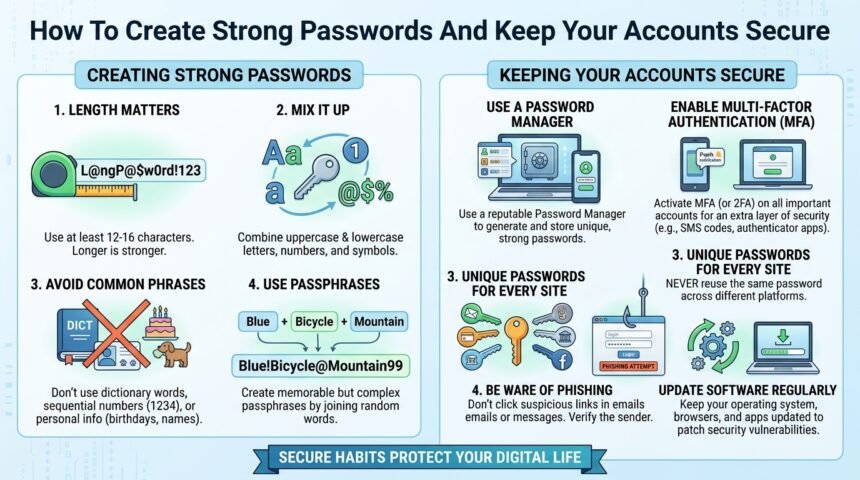
A strong password should be long, unique, and difficult to guess. It should include a combination of uppercase letters, lowercase letters, numbers, and special characters.
Avoid using personal information such as your name, birthday, phone number, or common words, as these are easier for attackers to predict.
Use A Different Password For Every Account
Using the same password on multiple websites is a major security risk. If one account is compromised, attackers may try the same password on other services.
Creating a unique password for each account limits the damage if a single password is exposed in a data breach.
Use A Password Manager
Remembering dozens of strong passwords can be difficult. A password manager securely stores your login credentials and can generate strong passwords automatically.
This allows you to use unique passwords for every account without needing to memorize each one.
Enable Multi-Factor Authentication
Multi-factor authentication adds an extra layer of protection by requiring a second verification method, such as a mobile app or security code, after entering your password.
Even if someone discovers your password, they will still need the additional verification step to access your account.
Update Passwords Regularly
It is good practice to change passwords for important accounts periodically, especially if you suspect an account has been compromised.
After a public data breach, immediately update affected passwords and avoid reusing old credentials.
Avoid Common Password Mistakes
Do not save passwords in plain text documents or share them through email or messaging apps. Always log out of important accounts when using shared or public computers.
Be cautious of phishing emails that attempt to trick you into revealing your login information on fake websites.
FAQs
What Makes A Password Strong
A strong password is long, unique, and includes a mix of letters, numbers, and special characters.
Why Should I Use Different Passwords
Using different passwords prevents attackers from accessing multiple accounts if one password is compromised.
What Is A Password Manager
A password manager is a secure application that stores and generates strong passwords for your online accounts.
Is Multi-Factor Authentication Necessary
Yes, multi-factor authentication provides an extra layer of security and significantly reduces the risk of unauthorized account access.
How Often Should I Change My Passwords
Update passwords whenever there is a suspected security issue or after a known data breach. Important accounts should also be reviewed regularly.
Conclusion
Strong passwords are one of the simplest and most effective ways to protect your online accounts. By creating unique passwords, using a password manager, enabling multi-factor authentication, and staying alert to phishing attempts, you can greatly improve your online security. Developing these habits will help keep your personal information safe in an increasingly connected digital world.